

What Is CPVLAB Pro Used For: Features, Reviews & Alternatives
Specialized tracker for pop/domain/contextual.
Editorially updated Oct 5, 2025
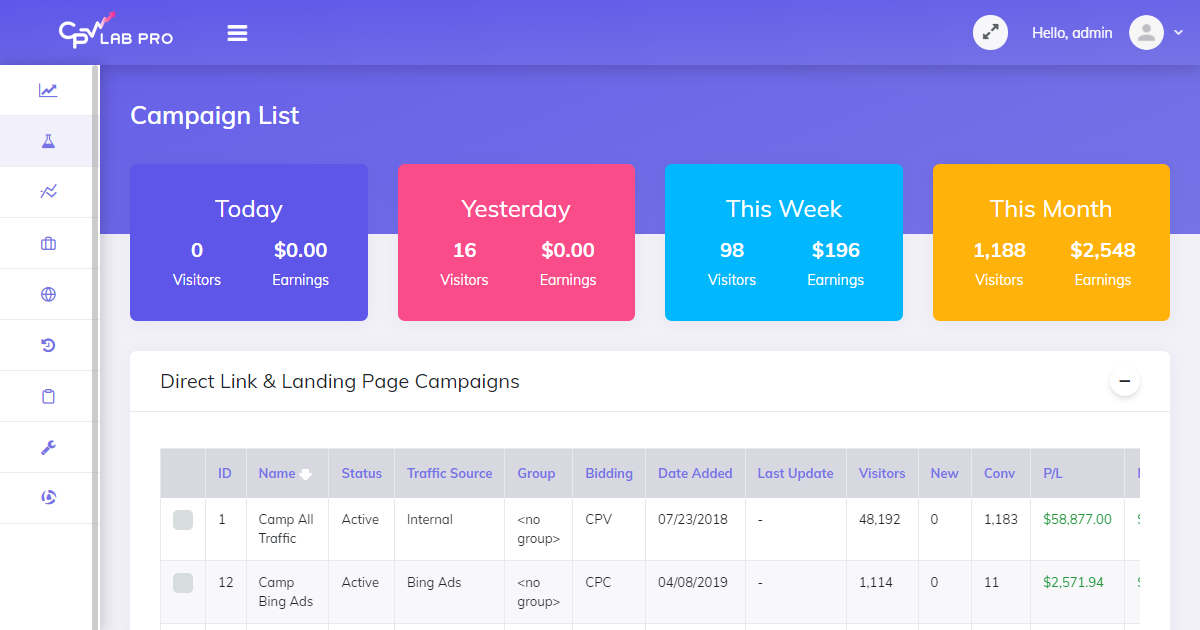
The overview
What CPVLAB Pro is for
1Core Capabilitie
- Campaign Setup Panel
- Postback URL Generation
- Sub-ID Tracking Configuration
- Redirect Path Editor
- Split Testing Module
2Specialized Workflow
- Pop/Redirect Campaign Builder
- Contextual Ad Grouping
- Bot/Fraud Filter Setting
- Custom Conversion Event Tracking
- Raw Log Data Export
Who it helps
Useful ways to use CPVLAB Pro
A practical path
Access Your Instance & Log In
Open your web browser and navigate to the URL where your installation resides (e.g., yourdomain.com/cpvlabpro). Enter your administrator credentials to access the dashboard
External signals
Reviews & reputation
Aggregated review score
Users value CPVLAB Pro for its robust self-hosted architecture, offering unparalleled control over tracking data and campaign infrastructure, especially for complex pop, domain, and contextual campaigns. While praised for its flexibility and cost-effectiveness compared to cloud alternatives, some users note the initial setup complexity and a less modern UI compared to newer SaaS trackers.
Quick answers
Frequently asked questions
1What are the server requirements for running CPVLAB Pro effectively?⌄
CPVLAB Pro is a self-hosted solution, requiring a dedicated or VPS server with a LAMP/LEMP stack (Linux, Apache/Nginx, MySQL, PHP). Specific requirements depend on traffic volume, but generally, a server with at least 4GB RAM and a fast SSD is recommended for high-volume campaigns to ensure optimal redirect speeds and database performance.
2How does CPVLAB Pro handle bot traffic and click fraud?⌄
CPVLAB Pro includes built-in bot and fraud filtering capabilities. You can configure rules based on IP ranges, user agents, referrer data, and click patterns. It also offers options to redirect suspicious traffic or mark it for exclusion from reports, helping to preserve data integrity and prevent wasted ad spend.
3Can I integrate CPVLAB Pro with any affiliate network or traffic source?⌄
Yes, CPVLAB Pro is designed for maximum flexibility. It supports integration with virtually any affiliate network or traffic source that provides postback URLs (server-to-server tracking) or allows pixel placement. You can define custom parameters and tokens to capture all necessary data points from your sources.
4Is there a limit to the number of campaigns or data points I can track?⌄
As a self-hosted solution, the primary limitations are your server's resources (CPU, RAM, disk I/O, database capacity). CPVLAB Pro itself does not impose artificial limits on the number of campaigns, offers, landers, or the volume of clicks/conversions you can track, making it scalable with your infrastructure.
5What kind of support is available if I encounter issues with my installation or tracking?⌄
CPVLAB Pro typically offers premium support packages, including installation assistance, configuration guidance, and troubleshooting for tracking discrepancies. Support is usually provided via a ticketing system or dedicated forum, focusing on technical issues related to the software's operation on your server.
Keep exploring