

What Is Mapy.cz Used For: Features, Reviews & Alternatives
Detailed maps with focus on Europe, hiking.
Editorially updated Oct 25, 2025
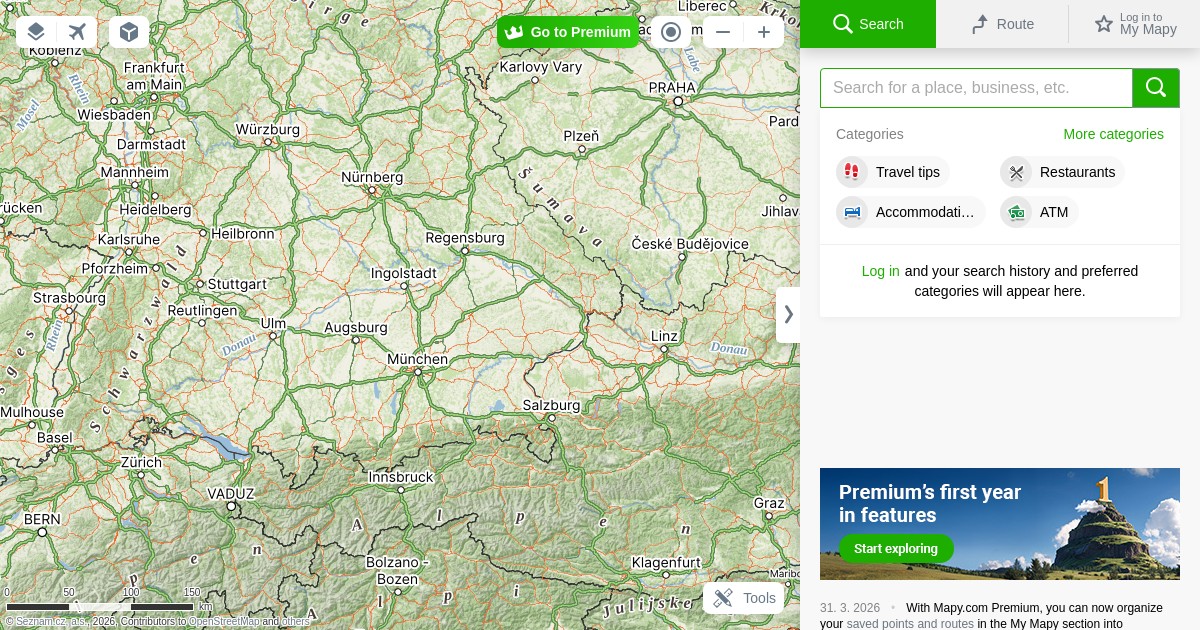
The overview
What Mapy.cz is for
1Core Capabilitie
- Map Layer Selector (standard, aerial, tourist, winter, historical)
- Address and POI Search Bar
- Route Planner Interface (car, public transport, walk, bike)
- Panoramic View (street-level imagery for specific regions)
- GPX Import/Export Functionality
2Specialized Workflow
- Terrain Profile Generator (for planned routes)
- Public Transport Connection Finder (with real-time data)
- Hiking Trail Network Overlay
- Cycling Path Network Overlay
- Saved Places Management (browser-based)
Who it helps
Useful ways to use Mapy.cz
A practical path
Initiate Location Search
Navigate to in your browser. Use the prominent search bar at the top-left to input a specific address, city name, or point of interest (e.g., 'Pražský hrad'). The map will center on the result
External signals
Reviews & reputation
Aggregated review score
Highly praised for its unparalleled detail in Central European outdoor maps, robust hiking/cycling route planning, and comprehensive public transport integration. Users frequently highlight its superior utility over global alternatives for specific regional exploration and activity planning.
Quick answers
Frequently asked questions
1Is Mapy.cz primarily focused on the Czech Republic, or does it offer global coverage?⌄
While Mapy.cz provides exceptional detail and specialized layers for the Czech Republic and Central Europe, its base map data and routing capabilities extend globally. Users can search and navigate in most countries, though the depth of specific features like detailed hiking trails or panoramic views might vary outside its core region.
2Can I use Mapy.cz for offline navigation on my mobile device?⌄
Yes, Mapy.cz offers dedicated mobile applications for both Android and iOS. These apps allow users to download entire regions for offline use, including detailed maps and routing capabilities, which is crucial for areas with limited mobile data coverage, especially during outdoor activities.
3What are the key differences between Mapy.cz and Google Maps for a European traveler?⌄
Mapy.cz often provides superior detail for hiking and cycling trails, specific tourist points, and terrain information, particularly within Central Europe. It also features unique map layers like historical maps or winter sports maps. Google Maps generally offers broader global coverage for street-level imagery and real-time traffic, but Mapy.cz excels in niche outdoor and local context for its strongholds.
4Are there any costs associated with using Mapy.cz, or is it entirely free?⌄
Mapy.cz is entirely free to use, both on its web platform and through its mobile applications. There are no subscription fees for accessing its core mapping, routing, or specialized layer functionalities. The service is supported by its parent company, Seznam.cz.
5How does Mapy.cz handle privacy regarding location data and user activity?⌄
Mapy.cz, as part of Seznam.cz, adheres to European data protection regulations. While it may use anonymized data for service improvement, personal location history or search queries are not publicly shared or used for targeted advertising without explicit user consent. Users can manage their privacy settings and delete saved locations or routes within their account.
Keep exploring